Check your math homework and find the exact line where it went wrong.
Most solvers only hand you an answer. Solvr’s Verifier compares your work to a verified solution and points at the step where you diverged, or tells you plainly that you got it right.
Free to start · No account required
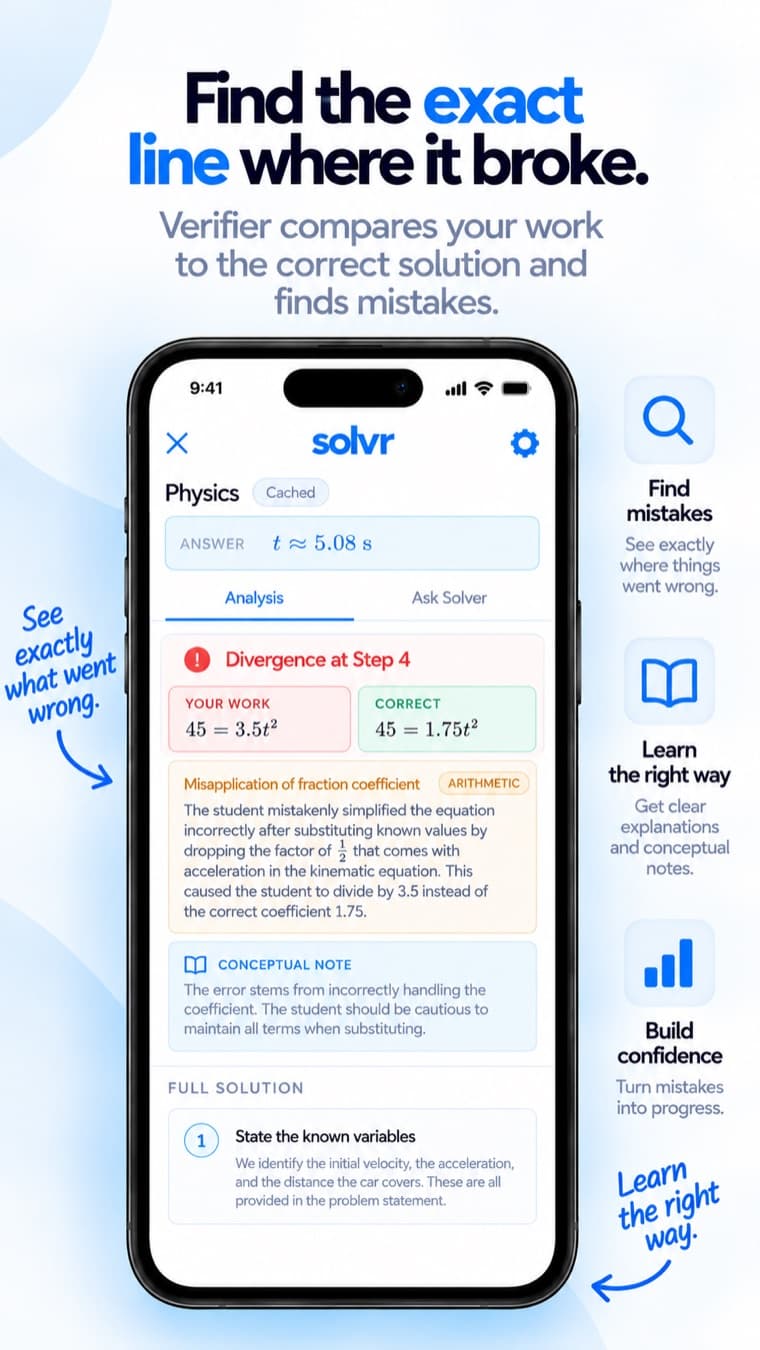
Pinpoints the exact step
Not “your answer is wrong.” Solvr shows your line next to the correct line and names the type of error, arithmetic, sign, misapplied rule.
Confirms when you’re right
If your work is correct, it says so. It never invents a mistake just to look useful.
Explains the concept behind the slip
Each mistake comes with a short conceptual note so the same error doesn’t come back on the exam.
Ask follow-ups on any step
Still stuck on one line? Ask for a deeper explanation until it clicks, without being handed the whole solution.
Questions
How do I check my math homework for mistakes?
Snap a photo of the problem and your own working in Solvr. The Verifier solves it independently, compares each of your steps to the correct solution, and highlights the first step where you diverged, with an explanation of why.
Does Solvr just give me the answer?
You can get the full step-by-step solution, but the point is checking your work and understanding it. You can ask follow-up questions on any single step instead of reading the whole solution.
What if my homework is already correct?
Solvr tells you. It is designed not to fabricate mistakes, so a “no errors found” result is meaningful.